Proxy Rules
Watch the walkthrough (jumps to the "Attaching proxy sets to alias" section):
Forward specific paths from your deployed content to external backend APIs, eliminating the need for CORS configuration.
Overview
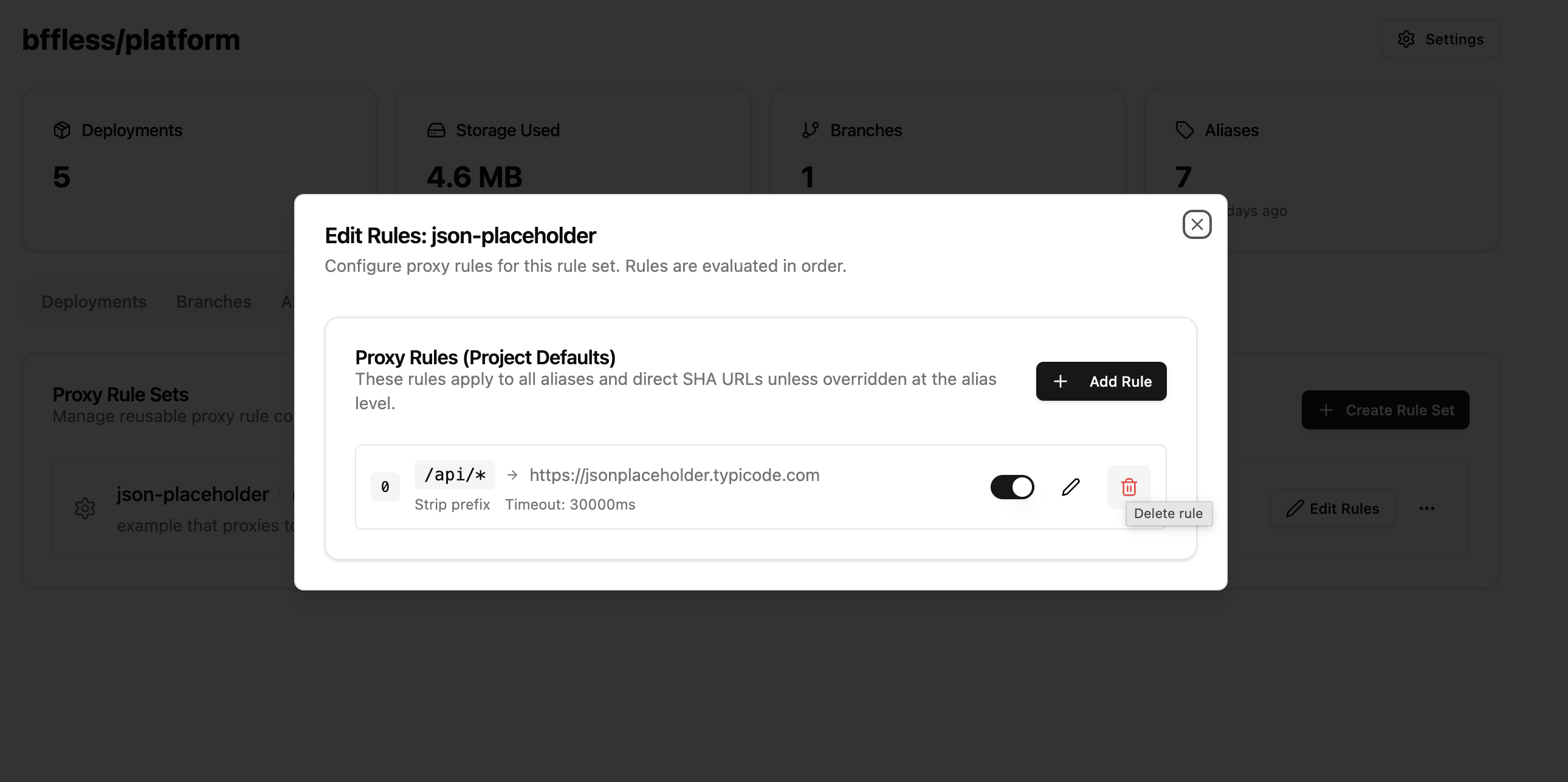
Proxy rules allow your SPAs and static sites to communicate with backend services using relative URLs. Instead of making cross-origin requests that require CORS headers, your frontend can call /api/* and BFFless will proxy those requests to your backend.
Live Example: https://orbs.sandbox.workspace.bffless.app/api/users proxies to https://jsonplaceholder.typicode.com/users
Key Concepts
Two-Level Configuration
Proxy rules use a two-level configuration system:
-
Project Defaults: Rules defined at the project level apply to:
- All aliases (production, staging, etc.)
- Direct SHA URL access
- Unless overridden by alias-level rules
-
Alias Overrides: Rules defined at the alias level:
- Override project defaults for that specific alias
- Useful for different backends per environment
Example Configuration
Project Default:
/api/*→https://dev-api.example.com(development API)
Production Alias Override:
/api/*→https://api.example.com(production API)
Result:
productionalias uses production APIstagingalias uses dev API (project default)- Direct SHA access uses dev API (project default)
Creating Proxy Rules
Via Project Settings
- Navigate to your project
- Go to Settings → Proxy Rules tab
- Click Add Rule
- Fill in the rule configuration:
- Path Pattern: The URL pattern to match (e.g.,
/api/*) - Target URL: The backend URL to proxy to (must be HTTPS)
- Strip Prefix: Whether to remove the matched prefix before forwarding
- Timeout: Request timeout in milliseconds (default: 30000)
- Description: Optional description for the rule
- Path Pattern: The URL pattern to match (e.g.,
- Click Create Rule
Via Alias Settings
- Navigate to your project
- Go to Aliases tab
- Click the Proxy button on an alias
- Add rules specific to that alias (these override project defaults)
Path Pattern Matching
Proxy rules support three types of patterns:
Prefix Wildcards (/api/*)
Matches any path starting with the prefix:
/api/*matches/api/users,/api/users/123,/api/posts
Suffix Wildcards (*.json)
Matches any path ending with the suffix:
*.jsonmatches/config.json,/data/settings.json
Exact Match (/graphql)
Matches the exact path only:
/graphqlmatches only/graphql, not/graphql/v2
Strip Prefix Option
The Strip Prefix option controls whether the matched path prefix is removed before forwarding:
| Request | Pattern | Target | Strip Prefix | Forwarded To |
|---|---|---|---|---|
/api/users | /api/* | https://jsonplaceholder.typicode.com | ✓ Yes | https://jsonplaceholder.typicode.com/users |
/api/users | /api/* | https://jsonplaceholder.typicode.com | ✗ No | https://jsonplaceholder.typicode.com/api/users |
Rule Ordering
Rules are evaluated in order (lower order number = higher priority). When multiple rules could match a request, the first matching rule is used.
To reorder rules:
- Go to the Proxy Rules tab
- Use drag-and-drop to reorder
- Or use the API to set specific order values
Header Configuration
Adding Custom Headers
You can add custom headers to proxied requests, useful for:
- API authentication keys
- Authorization tokens
- Custom tracking headers
{
  "headerConfig": {
    "add": {
      "X-API-Key": "your-secret-key",
      "Authorization": "Bearer your-token"
    }
  }
}
Header values are encrypted at rest using AES-256-GCM.
Default Header Handling
By default, the proxy:
- Forwards:
accept,content-type,user-agent, and most standard headers - Strips:
cookie,authorization(unless explicitly added) - Adds:
x-forwarded-for,x-forwarded-proto,x-forwarded-host
Security
HTTPS Requirement
All target URLs must use HTTPS. HTTP targets are rejected to ensure data security in transit.
SSRF Protection
To prevent Server-Side Request Forgery attacks, the following targets are blocked:
localhostand127.0.0.1- Internal IP ranges:
10.x.x.x,172.16-31.x.x,192.168.x.x - Cloud metadata endpoints:
169.254.169.254 - IPv6 local addresses
Timeout Limits
- Default timeout: 30 seconds
- Maximum allowed: 60 seconds
- Requests exceeding the timeout return a 504 Gateway Timeout
API Reference
Endpoints
| Method | Endpoint | Description |
|---|---|---|
| GET | /api/proxy-rules/project/:projectId | List project-level rules |
| POST | /api/proxy-rules/project/:projectId | Create project-level rule |
| PUT | /api/proxy-rules/project/:projectId/reorder | Reorder project rules |
| GET | /api/proxy-rules/alias/:aliasId | List alias-level rules |
| POST | /api/proxy-rules/alias/:aliasId | Create alias-level rule |
| PUT | /api/proxy-rules/alias/:aliasId/reorder | Reorder alias rules |
| GET | /api/proxy-rules/:id | Get specific rule |
| PATCH | /api/proxy-rules/:id | Update rule |
| DELETE | /api/proxy-rules/:id | Delete rule |
Example: Create a Proxy Rule
curl -X POST https://your-bffless.com/api/proxy-rules/project/{projectId} \
  -H "Content-Type: application/json" \
  -H "Cookie: sAccessToken=..." \
  -d '{
    "pathPattern": "/api/*",
    "targetUrl": "https://jsonplaceholder.typicode.com",
    "stripPrefix": true,
    "timeout": 30000,
    "description": "JSON Placeholder API proxy"
  }'
Example Response
{
  "id": "uuid-here",
  "projectId": "project-uuid",
  "aliasId": null,
  "pathPattern": "/api/*",
  "targetUrl": "https://jsonplaceholder.typicode.com",
  "stripPrefix": true,
  "order": 0,
  "timeout": 30000,
  "preserveHost": false,
  "headerConfig": null,
  "isEnabled": true,
  "description": "JSON Placeholder API proxy",
  "createdAt": "2025-12-06T12:00:00Z",
  "updatedAt": "2025-12-06T12:00:00Z"
}
Troubleshooting
Rule Not Matching
- Check the path pattern is correct
- Verify the rule is enabled (
isEnabled: true) - Check rule order - a higher-priority rule might be matching first
- For alias access, verify alias-level rules vs project defaults
502 Bad Gateway
The target server is unreachable or returned an error:
- Verify the target URL is correct and accessible
- Check if the target server is running
- Review target server logs for errors
504 Gateway Timeout
The request took longer than the configured timeout:
- Increase the timeout value if the backend is slow
- Check if the backend is responding within normal time
Connection Refused
The target URL hostname resolved but connection was refused:
- Verify the target port is correct
- Check firewall rules
- Ensure the target service is running
Best Practices
- Use specific patterns: Prefer
/api/v1/*over/api/*when possible - Set appropriate timeouts: Don't set excessively long timeouts
- Document rules: Use the description field to explain each rule's purpose
- Test thoroughly: Verify proxy behavior after creating or modifying rules
- Use alias overrides wisely: Only override at alias level when environments need different backends
Use Case: Centralized Feature Flags
Proxy rules enable powerful patterns like centralized feature flags that multiple projects can consume.
Architecture
Setup
- Create a feature flags project with JSON files:
feature-flags/
└── flags/
    ├── features.json       # Flag definitions
    └── environments/
        ├── production.json
        └── staging.json
-
Deploy to BFFless using the GitHub Action (uploads
flags/directory) -
Add proxy rule to consuming apps:
- Path Pattern:
/flags/* - Target URL:
https://demo-feature-flags.docs.bffless.app - Strip Prefix: Yes (so
/flags/features.json→/features.json)
- Path Pattern:
Example: Feature Flags JSON
{
  "flags": {
    "dark_mode": {
      "enabled": true,
      "description": "Enable dark mode UI theme",
      "rollout_percentage": 100
    },
    "new_checkout_flow": {
      "enabled": true,
      "description": "New streamlined checkout experience",
      "rollout_percentage": 50
    },
    "beta_dashboard": {
      "enabled": false,
      "description": "New analytics dashboard beta",
      "rollout_percentage": 0
    }
  },
  "version": "1.0.0",
  "last_updated": "2026-02-08T12:00:00Z"
}
Example: React Component
import { useState, useEffect } from 'react'

function App() {
  const [flags, setFlags] = useState(null)

  useEffect(() => {
    // Fetches from your domain, proxied to feature-flags project
    fetch('/flags/features.json')
      .then((res) => res.json())
      .then((data) => setFlags(data))
  }, [])

  if (!flags) return <p>Loading...</p>

  return (
    <div>
      {flags.flags.dark_mode.enabled && <DarkModeToggle />}
      {flags.flags.new_checkout_flow.enabled && <NewCheckout />}
    </div>
  )
}
Benefits
- No CORS issues - Flags fetched from same origin via proxy
- Centralized management - Update flags once, all apps get changes
- Version control - Flag changes tracked in Git
- Environment-specific - Use different flag files per environment
- No backend required - Pure static JSON files
Live Demo
See this pattern in action with our demo setup:
| URL | Description |
|---|---|
| demo.docs.bffless.app/flags/features.json | Fetches flags via proxy rule |
| demo-feature-flags.docs.bffless.app/features.json | Direct access to feature flags source |
Both URLs serve the same content, but the first goes through a proxy rule on the demo project.
How It Works
Configuration Details
Step 1: Create a Proxy Rule on the Demo Project
The demo project has a proxy rule that forwards all /flags/* requests to the feature flags project:
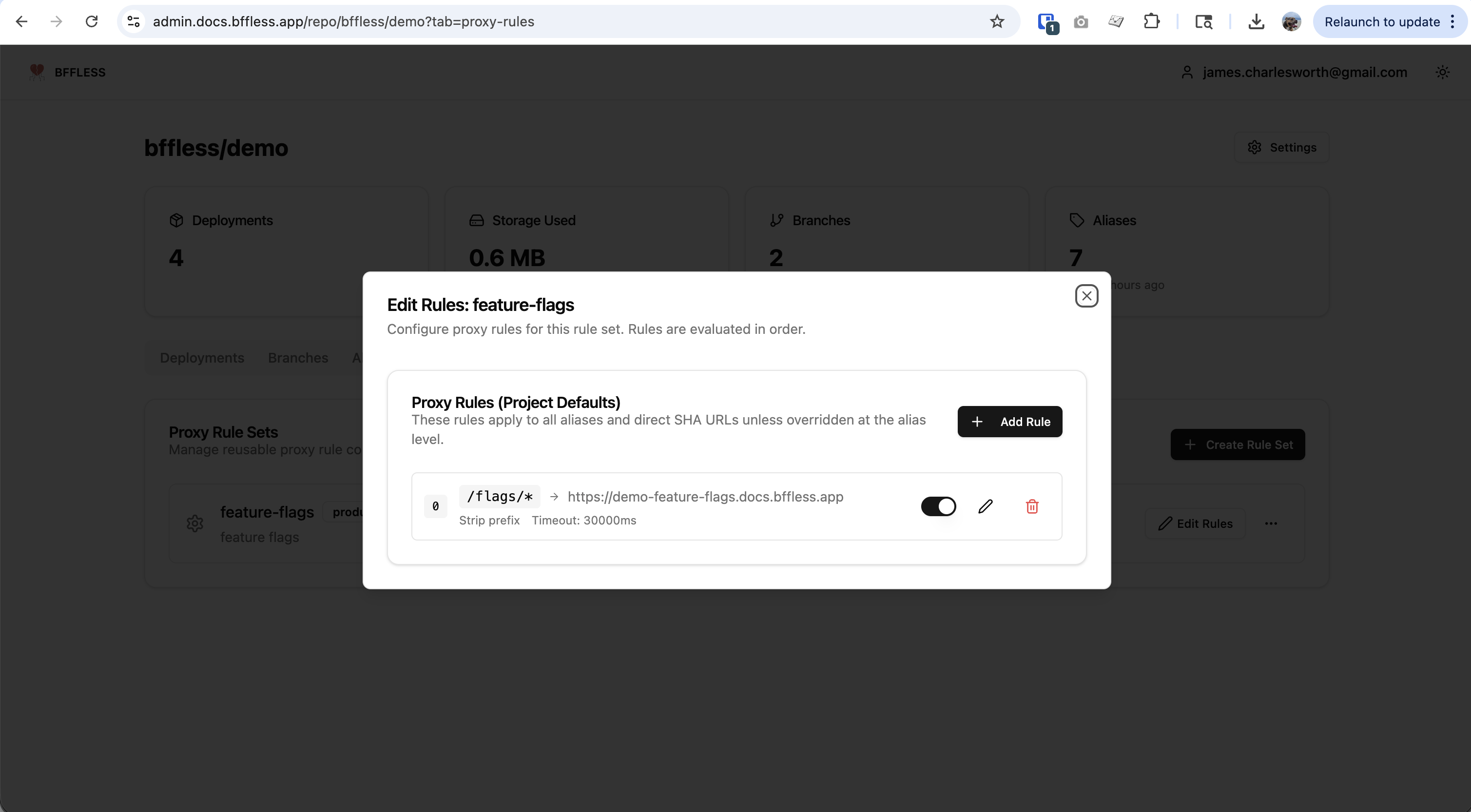
- Path Pattern:
/flags/*- matches any request starting with/flags/ - Target URL:
https://demo-feature-flags.docs.bffless.app - Strip Prefix: Enabled - removes
/flagsso/flags/features.jsonbecomes/features.json
Step 2: Configure the Feature Flags Domain
The feature flags project uses a domain mapping with a path prefix to serve files from a specific directory:
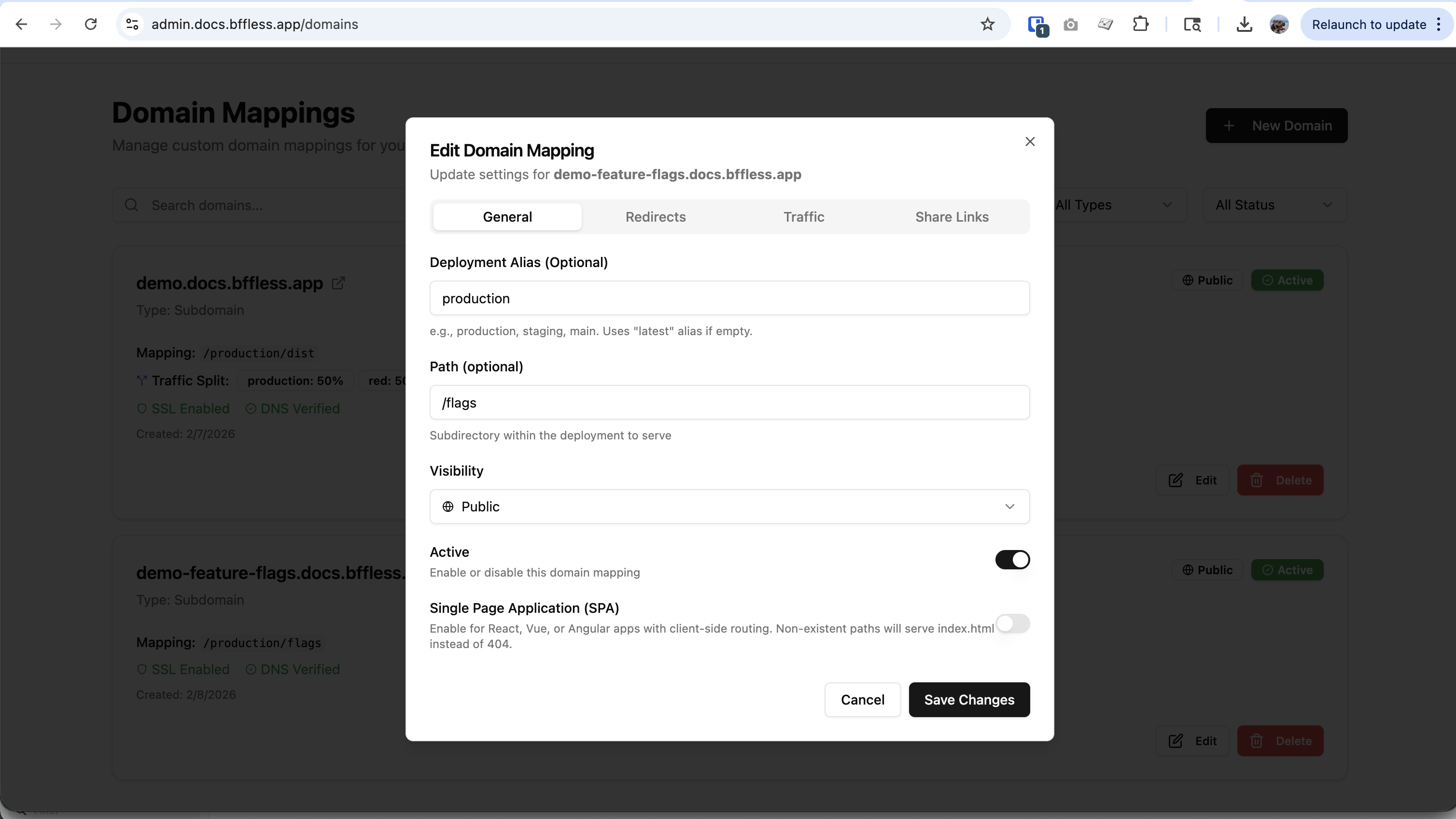
- Domain:
demo-feature-flags.docs.bffless.app - Mapping:
/production/flags- serves files from the flags subdirectory - Path:
/flags- the path prefix for this domain mapping
Request Flow Example
When a browser requests https://demo.docs.bffless.app/flags/features.json:
| Step | Action |
|---|---|
| 1 | Browser requests /flags/features.json from demo.docs.bffless.app |
| 2 | Proxy rule matches /flags/* pattern |
| 3 | Prefix /flags is stripped (because "Strip Prefix" is enabled) |
| 4 | Request forwarded to demo-feature-flags.docs.bffless.app/features.json |
| 5 | Feature flags project returns features.json |
| 6 | Response proxied back to browser |
This pattern allows any number of apps to consume the same centralized feature flags without CORS issues, simply by adding a proxy rule pointing to the feature flags project.
Related Features
- Traffic Splitting - A/B testing and canary deployments
- Share Links - Share private content without authentication