Visual Regression Testing
Watch the walkthrough (jumps to the "Playwright screenshot compare" section):
This recipe demonstrates how to compare screenshots between your pull requests and production, posting visual diffs as a PR comment. It uses the bffless/upload-artifact action to store baseline screenshots and the bffless/compare-screenshots action to compare and report results.
Overview
The pattern works as follows:
- Main branch workflow: After tests pass, capture screenshots and upload them to BFFless with a stable alias (e.g.,
screenshots-production) - PR workflow: Run tests, capture screenshots, then use
compare-screenshotsto fetch the baseline, compare pixel-by-pixel, and post a PR comment with visual diffs
This gives reviewers immediate visibility into visual changes without leaving the PR.
Prerequisites
- A project with visual/E2E tests that capture screenshots
- BFFless instance with API access configured
- GitHub repository with Actions enabled
Supported Screenshot Tools
The compare-screenshots action works with any tool that produces PNG screenshots:
| Tool | Description |
|---|---|
| Playwright | Modern E2E testing with built-in screenshot capture |
| Puppeteer | Headless Chrome/Chromium screenshots |
| Cypress | E2E testing with screenshot commands |
| Storybook | Component screenshots via Chromatic alternatives |
| Custom scripts | Any tool that outputs PNG files |
Step 1: Configure Screenshot Capture
First, set up your test runner to capture screenshots. Here's an example using Playwright:
Install Dependencies
pnpm add -D @playwright/test
pnpm exec playwright install chromium
Configure Playwright
import { defineConfig } from '@playwright/test'

export default defineConfig({
  testDir: './tests',
  snapshotDir: './screenshots',
  use: {
    baseURL: 'http://localhost:3000',
    screenshot: 'on',
  },
  projects: [
    {
      name: 'chromium',
      use: { browserName: 'chromium' },
    },
  ],
})
Add Screenshot Test
import { test, expect } from '@playwright/test'

test('home page', async ({ page }) => {
  await page.goto('/')
  await page.screenshot({ path: './screenshots/home-default.png' })
})

test('home page with counter', async ({ page }) => {
  await page.goto('/')
  await page.click('button')
  await page.screenshot({ path: './screenshots/home-counter.png' })
})
Add Test Scripts
{
  "scripts": {
    "test:vrt": "playwright test"
  }
}
The key output is a directory of PNG screenshots (e.g., ./screenshots/) that will be compared against the baseline.
Step 2: Main Branch Workflow
Update your main branch deployment workflow to upload screenshots as a baseline:
name: Deploy to Production

on:
  push:
    branches: [main]

permissions:
  contents: read

jobs:
  test-and-deploy:
    runs-on: ubuntu-latest
    steps:
      - uses: actions/checkout@v4

      - uses: pnpm/action-setup@v2
        with:
          version: 8

      - uses: actions/setup-node@v4
        with:
          node-version: '20'
          cache: 'pnpm'

      - run: pnpm install

      - name: Install Playwright browsers
        run: pnpm exec playwright install chromium

      - name: Build app
        run: pnpm build

      - name: Capture screenshots
        run: pnpm test:vrt

      - name: Upload screenshot baseline
        uses: bffless/upload-artifact@v1
        with:
          path: screenshots
          api-url: ${{ vars.BFFLESS_URL }}
          api-key: ${{ secrets.BFFLESS_API_KEY }}
          alias: screenshots-production
          description: 'Screenshot baseline for main@${{ github.sha }}'

      - name: Deploy
        run: echo "Deploy your app here"
        # ... rest of your deployment steps
The alias: screenshots-production ensures each push to main overwrites the previous baseline, always keeping the latest production screenshots available.
Step 3: PR Workflow with Comparison
Update your PR workflow to compare screenshots and post a comment:
name: PR Preview

on:
  pull_request:
    branches: ['*']

permissions:
  contents: read
  pull-requests: write  # Required for posting comments

jobs:
  test-and-preview:
    runs-on: ubuntu-latest
    steps:
      - uses: actions/checkout@v4

      - uses: pnpm/action-setup@v2
        with:
          version: 8

      - uses: actions/setup-node@v4
        with:
          node-version: '20'
          cache: 'pnpm'

      - run: pnpm install

      - name: Install Playwright browsers
        run: pnpm exec playwright install chromium

      - name: Build app
        run: pnpm build

      - name: Capture screenshots
        run: pnpm test:vrt

      - name: Compare screenshots
        uses: bffless/compare-screenshots@v1
        env:
          GITHUB_TOKEN: ${{ secrets.GITHUB_TOKEN }}
        with:
          path: ./screenshots
          baseline-alias: screenshots-production
          api-url: ${{ vars.BFFLESS_URL }}
          api-key: ${{ secrets.BFFLESS_API_KEY }}

      - name: Build preview
        run: pnpm build
        # ... rest of your preview deployment steps
The compare-screenshots action handles everything:
- Downloads the baseline screenshots from BFFless
- Compares each screenshot pixel-by-pixel using pixelmatch
- Generates diff images highlighting visual differences
- Posts a PR comment with the comparison results
- Generates a GitHub step summary
- Fails if visual differences exceed the threshold (configurable)
Example PR Comment
When the workflow runs, it posts a comment like this:
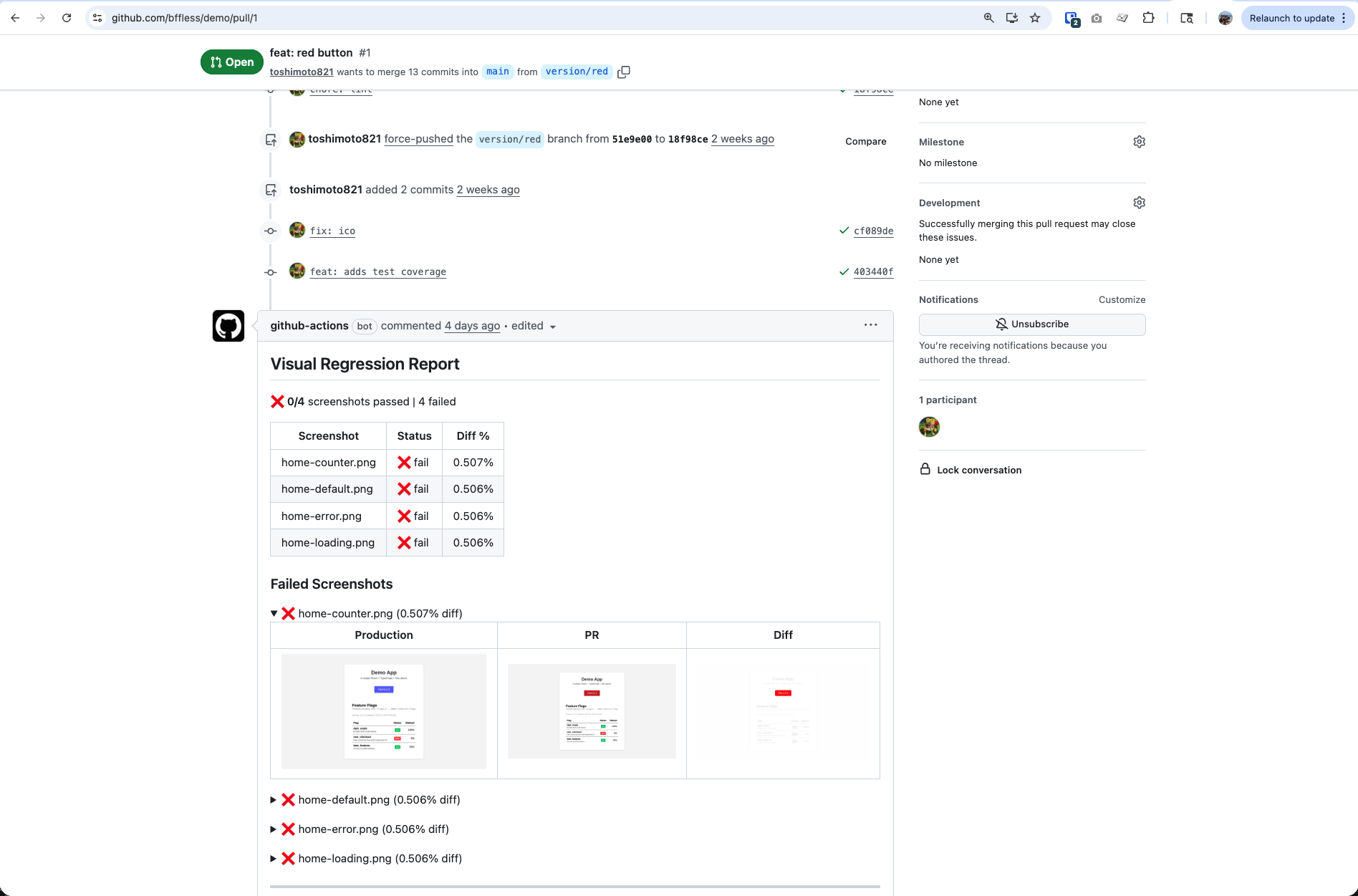
The comment includes:
- Summary status - Quick indicator showing passed/failed screenshots
- Results table - Screenshot name, status, and diff percentage for each image
- Failed screenshots - Expandable sections showing Production, PR, and Diff images side-by-side
On subsequent pushes to the same PR, the comment is updated rather than creating new comments.
Configuration Options
Adjust Diff Threshold
By default, the action fails on any visual difference above 0.1%. Use threshold to allow small variations:
- name: Compare screenshots
  uses: bffless/compare-screenshots@v1
  env:
    GITHUB_TOKEN: ${{ secrets.GITHUB_TOKEN }}
  with:
    path: ./screenshots
    baseline-alias: screenshots-production
    api-url: ${{ vars.BFFLESS_URL }}
    api-key: ${{ secrets.BFFLESS_API_KEY }}
    threshold: 0.5  # Allow up to 0.5% diff
Adjust Pixel Sensitivity
For minor color differences or anti-aliasing, adjust the pixel-level threshold:
- name: Compare screenshots
  uses: bffless/compare-screenshots@v1
  env:
    GITHUB_TOKEN: ${{ secrets.GITHUB_TOKEN }}
  with:
    path: ./screenshots
    baseline-alias: screenshots-production
    api-url: ${{ vars.BFFLESS_URL }}
    api-key: ${{ secrets.BFFLESS_API_KEY }}
    pixel-threshold: 0.2  # More lenient per-pixel comparison (0-1)
    include-anti-aliasing: true  # Include anti-aliasing in diff
Disable Failure on Difference
To report visual changes without failing the workflow:
- name: Compare screenshots
  uses: bffless/compare-screenshots@v1
  env:
    GITHUB_TOKEN: ${{ secrets.GITHUB_TOKEN }}
  with:
    path: ./screenshots
    baseline-alias: screenshots-production
    api-url: ${{ vars.BFFLESS_URL }}
    api-key: ${{ secrets.BFFLESS_API_KEY }}
    fail-on-difference: false
Use Screenshot Outputs
Access comparison values in subsequent steps:
- name: Compare screenshots
  id: vrt
  uses: bffless/compare-screenshots@v1
  env:
    GITHUB_TOKEN: ${{ secrets.GITHUB_TOKEN }}
  with:
    path: ./screenshots
    baseline-alias: screenshots-production
    api-url: ${{ vars.BFFLESS_URL }}
    api-key: ${{ secrets.BFFLESS_API_KEY }}
    fail-on-difference: false

- name: Check VRT result
  run: |
    echo "Total: ${{ steps.vrt.outputs.total }}"
    echo "Passed: ${{ steps.vrt.outputs.passed }}"
    echo "Failed: ${{ steps.vrt.outputs.failed }}"
    echo "Result: ${{ steps.vrt.outputs.result }}"

    if [ "${{ steps.vrt.outputs.result }}" == "fail" ]; then
      echo "::warning::Visual differences detected"
    fi
Available outputs: total, passed, failed, new, missing, result, report (JSON), baseline-commit-sha, and upload-url.
Custom Comment Header
Customize the PR comment identifier (useful if you have multiple screenshot comparisons):
- name: Compare desktop screenshots
  uses: bffless/compare-screenshots@v1
  env:
    GITHUB_TOKEN: ${{ secrets.GITHUB_TOKEN }}
  with:
    path: ./screenshots/desktop
    baseline-alias: screenshots-desktop-production
    api-url: ${{ vars.BFFLESS_URL }}
    api-key: ${{ secrets.BFFLESS_API_KEY }}
    comment-header: '## Desktop Visual Regression'

- name: Compare mobile screenshots
  uses: bffless/compare-screenshots@v1
  env:
    GITHUB_TOKEN: ${{ secrets.GITHUB_TOKEN }}
  with:
    path: ./screenshots/mobile
    baseline-alias: screenshots-mobile-production
    api-url: ${{ vars.BFFLESS_URL }}
    api-key: ${{ secrets.BFFLESS_API_KEY }}
    comment-header: '## Mobile Visual Regression'
Sharing an Alias with Other Content
The recipe above uses a dedicated screenshots-production alias so the action can find the baseline screenshots at the alias root. If you want to host screenshots alongside other artifacts (a build, a coverage report, etc.) under a single alias, point the action at the right subpath with baseline-path:
- name: Compare screenshots
  uses: bffless/compare-screenshots@v1
  env:
    GITHUB_TOKEN: ${{ secrets.GITHUB_TOKEN }}
  with:
    path: ./screenshots
    baseline-alias: production
    baseline-path: screenshots
    api-url: ${{ vars.BFFLESS_URL }}
    api-key: ${{ secrets.BFFLESS_API_KEY }}
Only files under <baseline-path>/ in the downloaded baseline are considered, so PNGs elsewhere in the alias (e.g. icons inside a coverage HTML report) don't pollute the comparison.
Disable Result Upload
By default, PR screenshots and diff images are uploaded to BFFless. To disable:
- name: Compare screenshots
  uses: bffless/compare-screenshots@v1
  env:
    GITHUB_TOKEN: ${{ secrets.GITHUB_TOKEN }}
  with:
    path: ./screenshots
    baseline-alias: screenshots-production
    api-url: ${{ vars.BFFLESS_URL }}
    api-key: ${{ secrets.BFFLESS_API_KEY }}
    upload-results: false
Troubleshooting
"No baseline found" warning
This is expected on the first PR before any code has been merged to main. Once you merge a PR, the main branch workflow will upload the baseline. The action will still report current screenshots.
Baseline download fails
Check that:
- The
baseline-aliasmatches exactly what you used inupload-artifact(screenshots-production) - The main branch workflow has run successfully at least once
- The API URL and key are configured correctly in repository variables/secrets
Screenshots don't match but look identical
Minor rendering differences can cause pixel-level changes. Try:
- Increasing
threshold(e.g.,0.5for 0.5% tolerance) - Increasing
pixel-threshold(e.g.,0.2for more lenient color comparison) - Setting
include-anti-aliasing: trueif differences are at edges
Different screenshot sizes cause failures
Screenshots must have the same dimensions to be compared. Ensure:
- Consistent viewport size in your test configuration
- Same browser and device settings across main and PR workflows
- No responsive breakpoint differences
CI screenshots differ from local
Ensure your CI environment matches local:
- Same browser version (use
playwright install chromiumconsistently) - Same fonts installed (consider using a Docker image with fonts)
- Same viewport and device pixel ratio settings
See It in Action
This recipe is implemented in the BFFless demo repository. Open a PR there to see the visual regression testing workflow in action.