Coverage Comparison
Watch the walkthrough (jumps to the "Compare coverage on PR" section):
This recipe demonstrates how to compare test coverage between your pull requests and production, posting the difference as a PR comment. It uses the bffless/upload-artifact action to store baseline coverage and the bffless/compare-coverage action to compare and report results.
Overview
The pattern works as follows:
- Main branch workflow: After tests pass, upload the coverage report to BFFless with a stable alias (e.g.,
coverage-production) - PR workflow: Run tests, then use
compare-coverageto automatically fetch the baseline, compare metrics, and post a PR comment
This gives reviewers immediate visibility into coverage impact without leaving the PR.
Prerequisites
- A project with tests that generate coverage reports
- BFFless instance with API access configured
- GitHub repository with Actions enabled
Supported Coverage Formats
The compare-coverage action supports multiple coverage formats:
| Format | File Types | Used By |
|---|---|---|
| lcov | .info, .lcov | Jest, c8, nyc, gcov, Vitest |
| istanbul | coverage-final.json | Jest, nyc, Istanbul |
| cobertura | .xml | Python (coverage.py), .NET, PHPUnit |
| clover | .xml | PHP (PHPUnit), Java |
| jacoco | .xml | Java, Kotlin, Scala |
The format is auto-detected, so you can use this recipe with any of these coverage tools.
Step 1: Configure Test Coverage
First, set up your test runner to output a coverage report. Here's an example using Vitest with LCOV format:
Install Dependencies
pnpm add -D vitest @vitest/coverage-v8
Configure Vitest
import { defineConfig } from 'vitest/config'
import react from '@vitejs/plugin-react'

export default defineConfig({
  plugins: [react()],
  test: {
    environment: 'jsdom',
    globals: true,
    coverage: {
      provider: 'v8',
      reporter: ['text', 'lcov', 'html'],
      reportsDirectory: './coverage',
    },
  },
})
Add Test Scripts
{
  "scripts": {
    "test": "vitest run",
    "test:coverage": "vitest run --coverage"
  }
}
The key output file is coverage/lcov.info, which contains detailed coverage data. You can also use json-summary format if preferred—the action auto-detects the format.
Step 2: Main Branch Workflow
Update your main branch deployment workflow to upload coverage as a baseline:
name: Deploy to Production

on:
  push:
    branches: [main]

permissions:
  contents: read

jobs:
  test-and-deploy:
    runs-on: ubuntu-latest
    steps:
      - uses: actions/checkout@v4

      - uses: pnpm/action-setup@v2
        with:
          version: 8

      - uses: actions/setup-node@v4
        with:
          node-version: '20'
          cache: 'pnpm'

      - run: pnpm install

      - name: Run tests with coverage
        run: pnpm test:coverage

      - name: Upload coverage baseline
        uses: bffless/upload-artifact@v1
        with:
          path: coverage/lcov.info
          api-url: ${{ vars.BFFLESS_URL }}
          api-key: ${{ secrets.BFFLESS_API_KEY }}
          alias: coverage-production
          description: 'Coverage baseline for main@${{ github.sha }}'

      - name: Build and deploy
        run: pnpm build
        # ... rest of your deployment steps
The alias: coverage-production ensures each push to main overwrites the previous baseline, always keeping the latest production coverage available.
Step 3: PR Workflow with Comparison
Update your PR workflow to compare coverage and post a comment:
name: PR Preview

on:
  pull_request:
    branches: ['*']

permissions:
  contents: read
  pull-requests: write  # Required for posting comments

jobs:
  test-and-preview:
    runs-on: ubuntu-latest
    steps:
      - uses: actions/checkout@v4

      - uses: pnpm/action-setup@v2
        with:
          version: 8

      - uses: actions/setup-node@v4
        with:
          node-version: '20'
          cache: 'pnpm'

      - run: pnpm install

      - name: Run tests with coverage
        run: pnpm test:coverage

      - name: Compare coverage
        uses: bffless/compare-coverage@v1
        env:
          GITHUB_TOKEN: ${{ secrets.GITHUB_TOKEN }}
        with:
          path: ./coverage/lcov.info
          baseline-alias: coverage-production
          api-url: ${{ vars.BFFLESS_URL }}
          api-key: ${{ secrets.BFFLESS_API_KEY }}

      - name: Build preview
        run: pnpm build
        # ... rest of your preview deployment steps
The compare-coverage action handles everything:
- Downloads the baseline coverage from BFFless
- Parses both coverage reports
- Compares metrics (lines, branches, functions, statements)
- Posts a PR comment with the comparison table
- Generates a GitHub step summary
- Fails if coverage regresses (configurable)
Example PR Comment
When the workflow runs, it posts a comment like this:
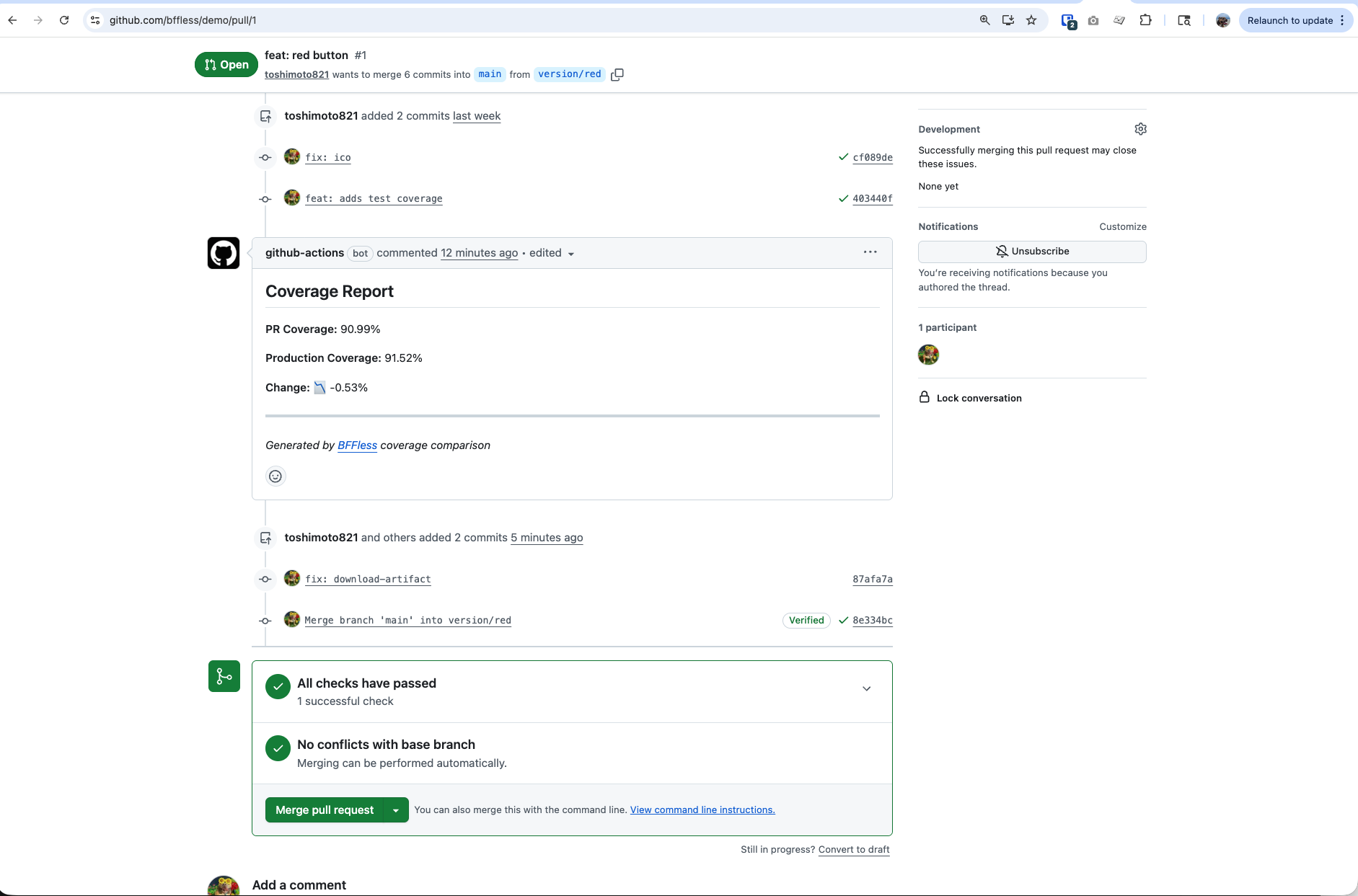
The comment includes:
- Summary callout - Quick indicator if coverage improved, regressed, or stayed the same
- Metrics table - Side-by-side comparison of all coverage metrics (statements, branches, functions, lines)
- Baseline info - Shows which commit the baseline came from
On subsequent pushes to the same PR, the comment is updated rather than creating new comments.
Configuration Options
Allow Minor Regression
By default, the action fails on any coverage regression. Use threshold to allow small decreases:
- name: Compare coverage
  uses: bffless/compare-coverage@v1
  env:
    GITHUB_TOKEN: ${{ secrets.GITHUB_TOKEN }}
  with:
    path: ./coverage/lcov.info
    baseline-alias: coverage-production
    api-url: ${{ vars.BFFLESS_URL }}
    api-key: ${{ secrets.BFFLESS_API_KEY }}
    threshold: 1  # Allow up to 1% regression
Disable Failure on Regression
To report coverage changes without failing the workflow:
- name: Compare coverage
  uses: bffless/compare-coverage@v1
  env:
    GITHUB_TOKEN: ${{ secrets.GITHUB_TOKEN }}
  with:
    path: ./coverage/lcov.info
    baseline-alias: coverage-production
    api-url: ${{ vars.BFFLESS_URL }}
    api-key: ${{ secrets.BFFLESS_API_KEY }}
    fail-on-regression: false
Use Coverage Outputs
Access coverage values in subsequent steps:
- name: Compare coverage
  id: coverage
  uses: bffless/compare-coverage@v1
  env:
    GITHUB_TOKEN: ${{ secrets.GITHUB_TOKEN }}
  with:
    path: ./coverage/lcov.info
    baseline-alias: coverage-production
    api-url: ${{ vars.BFFLESS_URL }}
    api-key: ${{ secrets.BFFLESS_API_KEY }}
    fail-on-regression: false

- name: Check coverage result
  run: |
    echo "Lines: ${{ steps.coverage.outputs.lines }}%"
    echo "Delta: ${{ steps.coverage.outputs.lines-delta }}%"
    echo "Result: ${{ steps.coverage.outputs.result }}"

    if [ "${{ steps.coverage.outputs.result }}" == "fail" ]; then
      echo "::warning::Coverage regressed beyond threshold"
    fi
Available outputs: statements, branches, functions, lines, and their -delta variants. The result output is pass, fail, or improved.
Sharing an Alias with Other Content
The recipe above uses a dedicated coverage-production alias so the action can find lcov.info at the alias root. If you'd rather host the coverage report alongside other artifacts (a build, screenshots, a Playwright report, etc.) under a single alias, point the action at the right subpath with baseline-path:
- name: Compare coverage
  uses: bffless/compare-coverage@v1
  env:
    GITHUB_TOKEN: ${{ secrets.GITHUB_TOKEN }}
  with:
    path: ./coverage/lcov.info
    baseline-alias: production
    baseline-path: coverage/lcov.info
    api-url: ${{ vars.BFFLESS_URL }}
    api-key: ${{ secrets.BFFLESS_API_KEY }}
baseline-path accepts either a file (used directly) or a directory (searched for a known coverage filename), so it works for any of the supported formats.
Custom Comment Header
Customize the PR comment identifier (useful if you have multiple coverage reports):
- name: Compare frontend coverage
  uses: bffless/compare-coverage@v1
  env:
    GITHUB_TOKEN: ${{ secrets.GITHUB_TOKEN }}
  with:
    path: ./coverage/lcov.info
    baseline-alias: coverage-frontend-production
    api-url: ${{ vars.BFFLESS_URL }}
    api-key: ${{ secrets.BFFLESS_API_KEY }}
    comment-header: '## Frontend Coverage'

- name: Compare backend coverage
  uses: bffless/compare-coverage@v1
  env:
    GITHUB_TOKEN: ${{ secrets.GITHUB_TOKEN }}
  with:
    path: ./backend-coverage/lcov.info
    baseline-alias: coverage-backend-production
    api-url: ${{ vars.BFFLESS_URL }}
    api-key: ${{ secrets.BFFLESS_API_KEY }}
    comment-header: '## Backend Coverage'
Troubleshooting
"No baseline found" warning
This is expected on the first PR before any code has been merged to main. Once you merge a PR, the main branch workflow will upload the baseline. The action will still report current coverage.
Baseline download fails
Check that:
- The
baseline-aliasmatches exactly what you used inupload-artifact(coverage-production) - The main branch workflow has run successfully at least once
- The API URL and key are configured correctly in repository variables/secrets
Coverage numbers don't match local
Ensure you're running the same test command locally (pnpm test:coverage) and that your CI environment matches your local Node.js version.
Wrong coverage format detected
If auto-detection picks the wrong format, explicitly set it:
- name: Compare coverage
  uses: bffless/compare-coverage@v1
  env:
    GITHUB_TOKEN: ${{ secrets.GITHUB_TOKEN }}
  with:
    path: ./coverage/lcov.info
    baseline-alias: coverage-production
    api-url: ${{ vars.BFFLESS_URL }}
    api-key: ${{ secrets.BFFLESS_API_KEY }}
    format: lcov  # Explicitly set format
See It in Action
This recipe is implemented in the BFFless demo repository. Open a PR there to see the coverage comparison workflow in action.
Live Coverage Report
The HTML coverage report from the demo repository is hosted on BFFless and available at:
demo-coverage.docs.bffless.app
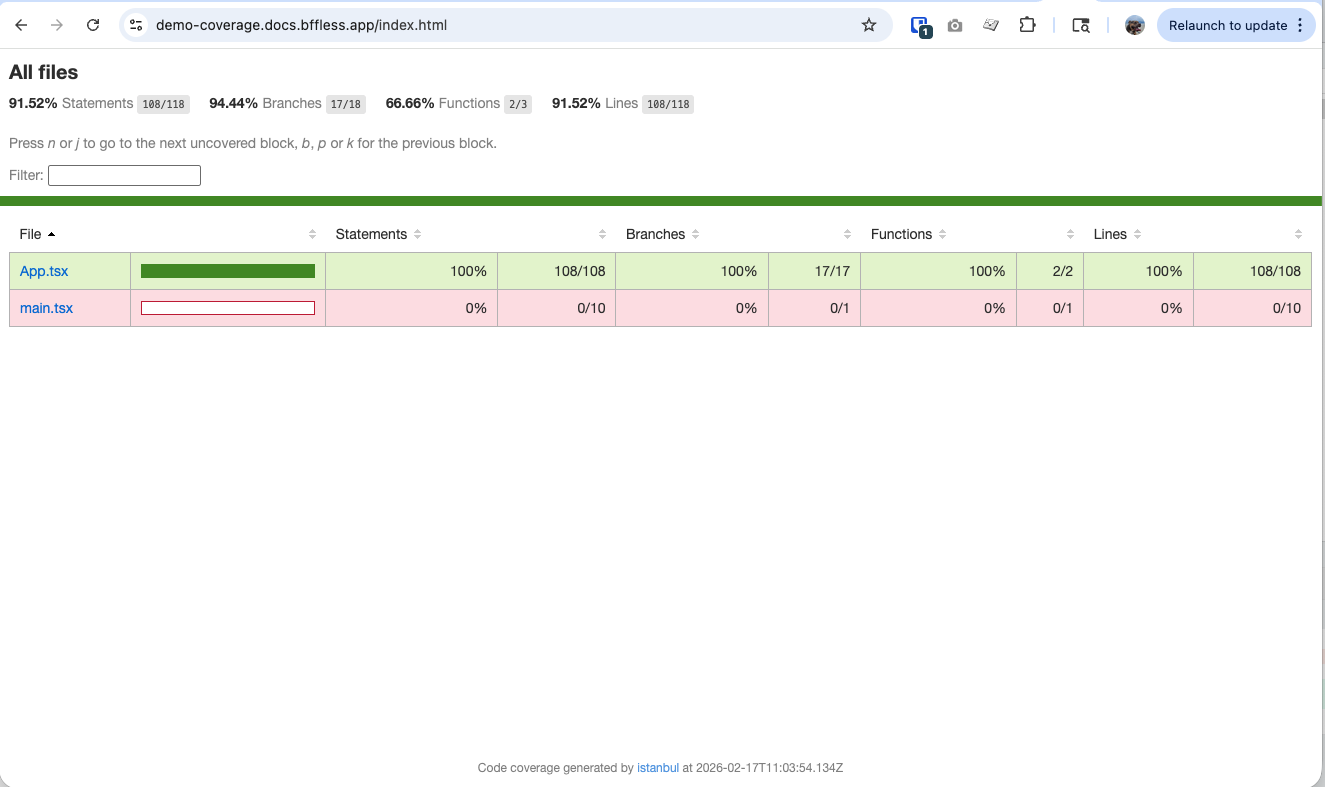
This demonstrates how BFFless can host not just your application builds, but also auxiliary artifacts like coverage reports, making them easily accessible to your team.